> For the complete documentation index, see [llms.txt](https://socialbiz.gitbook.io/socialbiz/llms.txt). Markdown versions of documentation pages are available by appending `.md` to page URLs; this page is available as [Markdown](https://socialbiz.gitbook.io/socialbiz/faq/error/14.md).
# PC Web의 캐러셀 기능 지원 안내
캐러셀 메시지를 설정하시는 경우 PC(web) 환경에서 아래와 같은 현상이 발생될 수 있어요.\
메시지를 보내실 때에는 인스타그랩 앱에서 확인하는 것을 안내해주시길 권장드려요.
META 의 캐러셀 기능이 업데이트되지 않아 발생하는 오류이며, 해결을 위한 방법을 검토 중이에요. \ 캐러셀 기능이 보완되는대로 빠르게 고객님들께 안내드릴 예정이에요. 😀
## PC 환경에서 캐러셀 메시지 확인 시 오류 현상
1. **캐러셀에 설정한 링크로 페이지가 연결되지 않아요.**\
캐러셀을 클릭해도 해당 링크로 연결되지 않을 수 있어요.
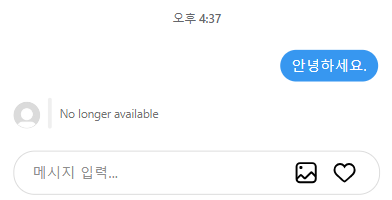
2. **캐러셀이 보이지 않아요.**\
캐러셀에 버튼을 추가하신 경우 캐러셀 메시지가 아래와 같이 표시될 수 있어요.
2. **캐러셀 버튼이 클릭되지 않아요.**\
캐러셀 버튼을 인스타그램 PC에서 클릭할 경우 링크가 정상적으로 이동되지 않을 수 있어요.